Download Kruvo

Install the app for your operating system, add a model provider or connect Ollama, then choose a working folder.

Windows v0.3.16 · macOS v0.3.16

macOS 13.5+ for full functionality

Separate builds for Apple Silicon and Intel Macs. PDF image rendering and browser automation require newer macOS support; use macOS 13.5+ for full functionality. Older macOS versions have not been validated for this release.

These macOS builds are not notarised. Verify the DMG first, then consult the linked per-app Gatekeeper guidance; do not disable protection globally.

macOS: verify before opening

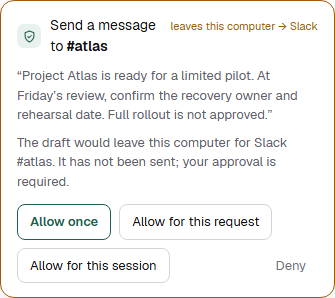
Kruvo 0.3.4 interface · demonstration data

Kruvo 0.3.4 desktop interface awaiting your approval to send a demonstration Project Atlas update through simulated Slack.
Kruvo 0.3.4 desktop interface with demonstration data and a simulated Slack connection. No model was run, no message was sent and no external action was performed.Kruvo 0.3.4 desktop interface detail with demonstration data and simulated Slack. No model run, message sent or external action; not a mobile app.

Verify your download

These hashes match the versioned files above. Compare against the public release before opening the installer. An updater signature is not Windows code-signing or macOS notarisation.

Inspect SHA-256 checksums
Kruvo-windows-setup.exe
18e789e2f2738bd2fa314e7bf05518231ffef1f580d0b8ca592650fb678fc099
Kruvo-windows.msi
922a32d339728d4c7107a9a70fb75a0f21ef50e4185d1cf95e00a0610f72ee69
Kruvo-macos-arm64.dmg
e6f9b1183a566a2dbc34bca9d855cf3fff696d475508f8db90d202798b49adad
Kruvo-macos-x64.dmg
44308c690e215e9df5de8c56a854c4c6e854495ad0dcce6c06cd124c19c92242

Verification and installation help
Requirements

  • Windows 10 22H2, Windows 11, or macOS 13.5+ for full functionality. Older macOS versions have not been validated for this release.
  • A supported provider API key or a local model through Ollama.
  • Optional Telegram or Slack credentials for remote requests and eligible approvals; keep Kruvo running on the computer.
  • Computer use requires a compatible app and setup; browser work needs Chrome or Edge, and the extension mode uses a version-matched package and native-host registration.

Use your provider API key, or run a local model through Ollama. API providers charge for usage separately from Kruvo.

Manual setup · compatible app and package