



Conceptual editorial image of a sunlit atelier with a metal worktable and a person using a laptop.

AI for work on your computer.

Prepare reports, review code and draft updates from your files and connected tools. Choose the model and permissions Kruvo uses.

Desktop app for Windows and macOS

Your API key or local Ollama. Provider charges are separate.

Files and tools

Set up Kruvo

Inside Kruvo

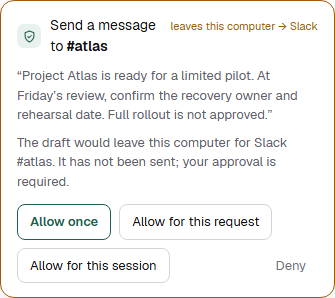
Check the output and review approval requests in the app. A draft message remains unsent.

Security

Kruvo 0.3.4 interface · demonstration data

Inspect the source files
Kruvo 0.3.4 desktop interface awaiting your approval to send a demonstration Project Atlas update through simulated Slack.
Kruvo 0.3.4 desktop interface with demonstration data and a simulated Slack connection. No model was run, no message was sent and no external action was performed.Kruvo 0.3.4 desktop interface detail with demonstration data and simulated Slack. No model run, message sent or external action; not a mobile app.
Read a worked exampleAn illustrative brief, with its original source files.

Illustrative example

Written for this walkthrough, not a recorded product run. No services are connected and no message is sent.

Project Atlas

Brief for Friday’s review

project-brief.md

Project Atlas is ready for a limited pilot, not a full rollout.

Compare sourceproject-notes.md
The import workflow passed review. A limited pilot is ready. A full rollout has not been approved.

The notes distinguish pilot readiness from approval for a full rollout.

Open source file

Recovery has not been rehearsed.

Compare sourcerisks.csv
risk,status,proposed_owner Recovery not rehearsed,open,Maya

The recovery risk remains open in the source register.

Open source file

Maya is the proposed owner, not a confirmed assignment.

Compare sourcedecisions.md
Not approved: full rollout. Maya is a proposed recovery owner, not an assigned owner.

Maya’s assignment still needs confirmation at the review.

Open source file

Source comparisons added for this walkthrough. Open the original files to check each statement.

For Friday’s review

At Friday’s review, confirm the recovery owner and schedule a rehearsal before expanding the pilot.

Download the example brief
Read the draft team message
Project Atlas can start a limited pilot. Please confirm recovery ownership and a rehearsal date at Friday’s review before approving a full rollout.

No message is sent. This walkthrough only shows the draft. In the product, sending to a connected channel is an external action subject to its approval policy.

Your working setup

Getting started
Model

Connect a supported model provider or run a local model through Ollama on suitable hardware. Providers charge for API usage separately.

OpenAI · Anthropic · Gemini · Mistral · DeepSeek · Kimi · Qwen · xAI · Ollama

Connected tools

The session uses your chosen working folder and the tools enabled for the task.

GitHub · Slack · Gmail · Outlook · Calendar · Notion · Jira · Linear · HubSpot · MCP

Hosted models and connected services receive the data needed for their requests.

Browser and Windows apps

Extension setup
Consent and supervision

Kruvo works in its own Chrome or Edge profile, or in a dedicated tab of your signed-in browser through the extension. On Windows, it also works in authorised foreground apps. Enable computer use, grant access and supervise the task.

Computer use requires a compatible Kruvo 0.3.4 app and configuration. Screenshots go to your chosen model provider. Scheduled automations do not use the browser or desktop applications.

  • Consent per site

    Kruvo asks before using a site. Allow an action, create a standing grant for the site or deny access. Review or revoke grants in Settings.

  • Supervised execution

    Review the proposed steps and sites, then approve the plan. Ordinary clicks and typing proceed while you supervise; you can pause, take over or stop.

  • Approval for sensitive actions

    Computer actions classified as sensitive require approval in the desktop app in every mode. Unverifiable targets are treated as sensitive. Banking and similar categories are blocked by default.

Teams of coworkers

How teams work
Specialists, teams and work across your computers

Kruvo 0.3.16 lets you use several coworkers on one computer and organise them in teams. A team lead can staff managers who lead teams of their own, up to four levels. Computers signed in to the same Kruvo account can share the work: a coordinator drafts a plan that assigns steps to coworkers on different computers.

Requires Kruvo 0.3.16. To work across computers, each computer must be signed in to the same Kruvo account; steps and results pass through the Kruvo Cloud relay.

  • Plans wait for your approval

    A plan runs only after you review and approve it in the app. Each item given to a team member on another computer needs your approval too. Per-tool approvals and local permissions on each computer are unchanged.

  • Organisation view

    Tasks → Organisation shows the org chart and what each member is working on. Pausing a team also pauses every team below it.

  • Shared limit

    An organisation shares a budget of 150 automatic wake-ups per hour across all of its teams.

PaxHelm, Talqivo and other connections

Connect with PaxHelm and Talqivo

Connect Kruvo with PaxHelm and Talqivo through MCP, using the accounts and permissions you choose.

Accounts, subscriptions and permissions stay separate. Connections share only what the chosen token and enabled tools allow.

See connection setup

PaxHelm ↗

Read projects, notes and tasks from PaxHelm when preparing a report or planning follow-up work.

Talqivo ↗

Use Talqivo's tasks and documents as source material for work in Kruvo.

From the release notes

Release notes
  • 0.3.16

    Teams of coworkers across your computers

    Each computer offers all of its enabled coworkers to plans, together with its operating system, computer-control access and connectors.

  • 0.3.6

    Stable updates and native menus in your language

    The stable update feed covers Windows and both Mac architectures.

Install Kruvo

The local app is free. Windows and macOS.

Download Kruvo

Your API key or local Ollama. Provider charges are separate.